


A new pair of hands for repetitive work.
AI workers for the software you already use. Watch, direct and take over at any moment.
In development · the walkthrough below uses fictional data and runs no live worker

Set the task.
Start with a clear brief and useful boundaries.
Illustrative Millwright workflow · Enquiry received
Give the assistant a brief, an approved source and a limit on what it may change.
How it works
Always visible. Always yours.
Millwright is built to support people, not to work around them. Every action is visible as it happens, and the person supervising can step in at any point.
Watch
See every click and keystroke live, with a clear record of what was done and why.
Direct
Give instructions in plain language and adjust priorities as the work happens.
Take over
Step in at any moment. Your team is always in control of the outcome.
From the pilot
Real workers, on real desktops.
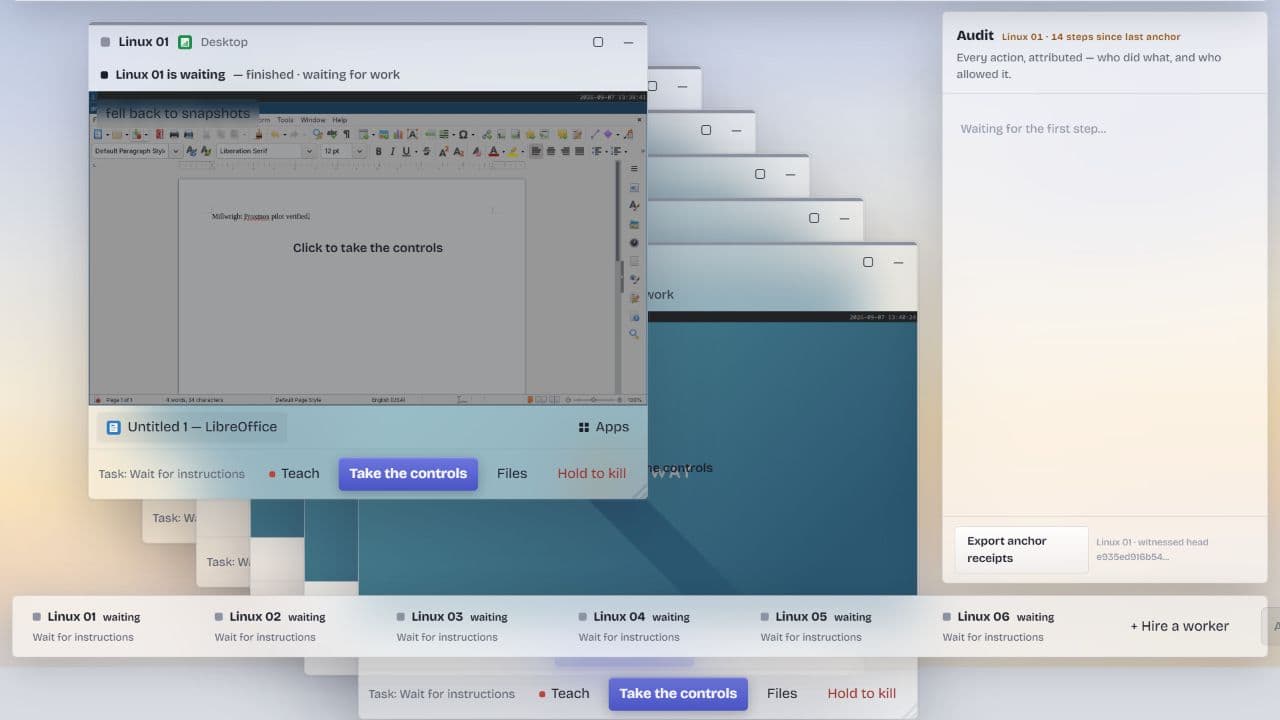
The supervision console during the September 2026 Linux pilot: six workers, one live desktop, and a person able to take the controls at any moment. This capture verified human control and hand-back, not a finished workflow.
Illustrative walkthrough
From brief to human approval.
Set a boundary, add an instruction and review a sample draft. Fictional data, nothing sent anywhere, and no live worker: Millwright is in development.
Bring the repetitive work you would hand over first.
Tell us about the task, the software it lives in and who would supervise it. Our team reads every request and replies within one working day.